

AI-assisted drafting for SOWs, SOOs, and PWSs.
SOWrite helps federal acquisition teams turn early-stage requirements into clear, complete acquisition documents. Whether you need a Statement of Work, a Statement of Objectives, or a Performance Work Statement, SOWrite asks the questions a seasoned acquisition specialist would ask, captures the answers, and generates a structured document ready for inclusion in an RFP package.
Drafting a clear SOW is harder than it should be.
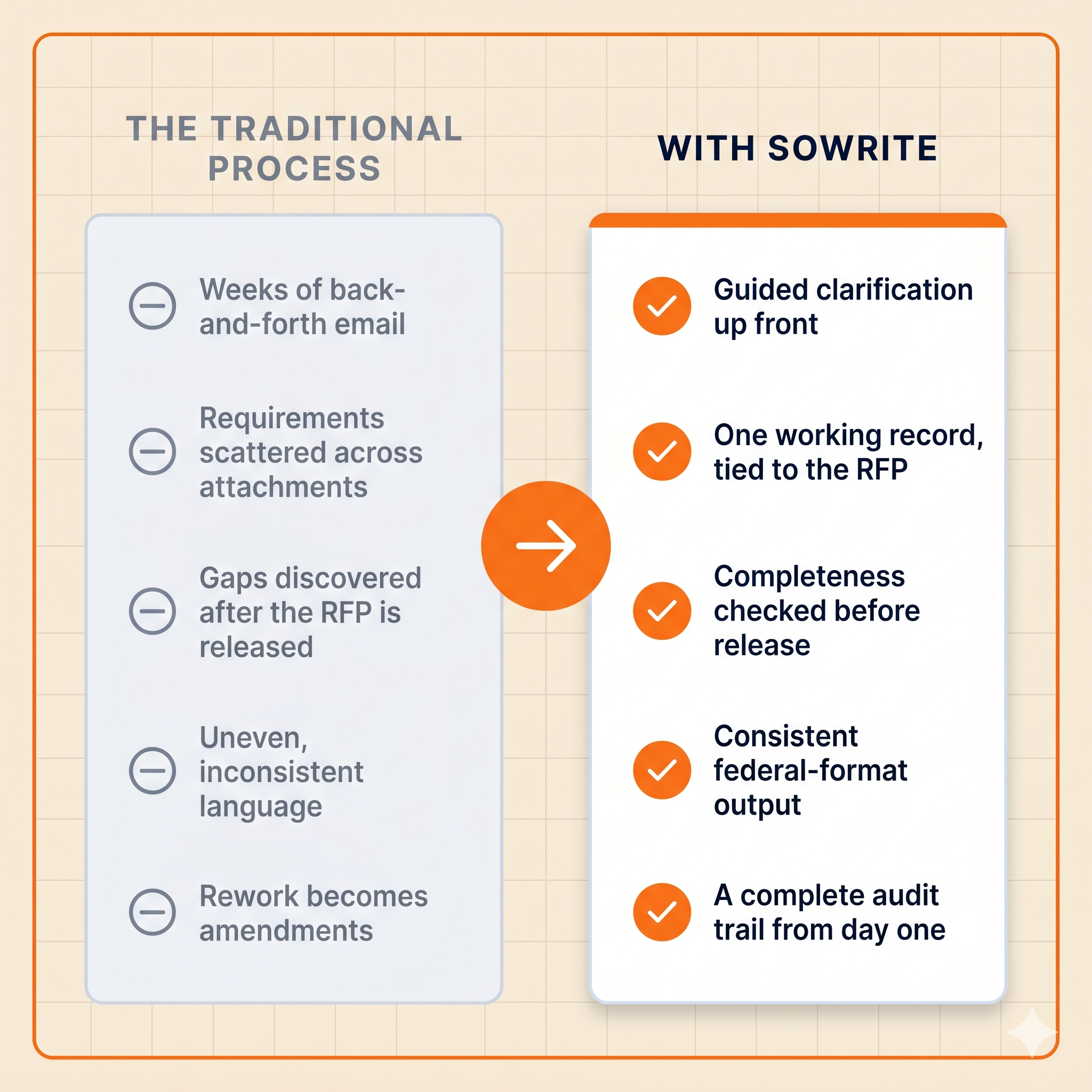
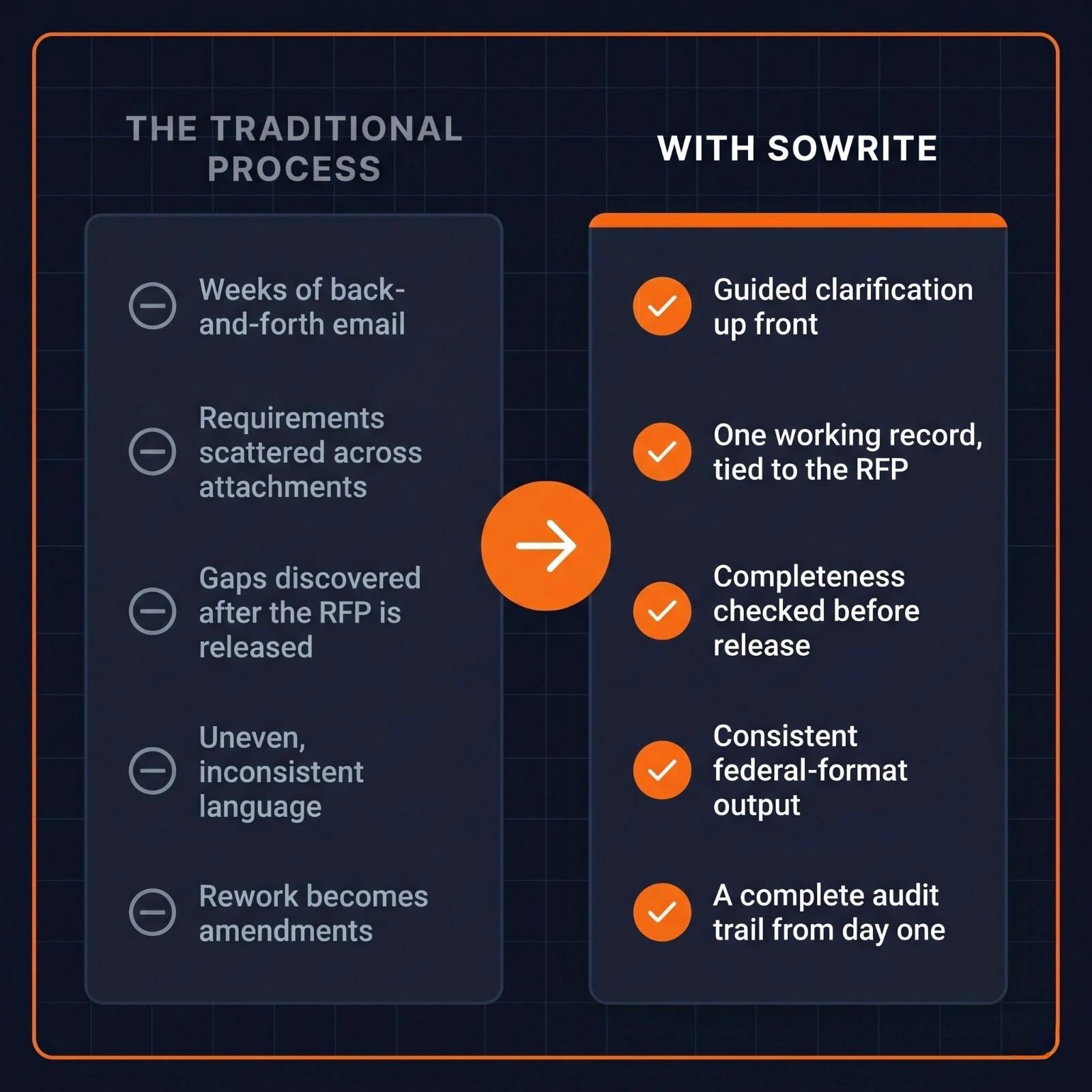
Most SOWs start the same way. A program office knows what it needs but doesn't yet know how to write it down in the structure an RFP demands. Acquisition specialists chase down missing details over weeks of email and meetings. Requirements arrive incomplete, contradictory, or wrapped inside attachments that nobody has time to read. By the time the document is ready for the contracting officer, the schedule is tight, the language is uneven, and the gaps that get caught later become amendments, questions from potential suppliers, or scope problems on the back end.
SOWrite was built for this part of the work. It gives requirements owners a structured place to start, runs an AI-guided clarification process that surfaces the missing pieces before they become problems, and generates an acquisition document that is consistent in format, complete in coverage, and traceable back to the requirements that produced it.
It is the natural companion to Scorify. SOWrite helps you write a better RFP. Scorify helps you evaluate the proposals that come back.
From a blank page to a finished document, in a workflow your team already uses.
SOWrite walks an acquisition team through four connected stages. Each stage produces an artifact that feeds the next, so nothing is lost between handoffs and every decision is captured in the audit trail.
Choose your document type
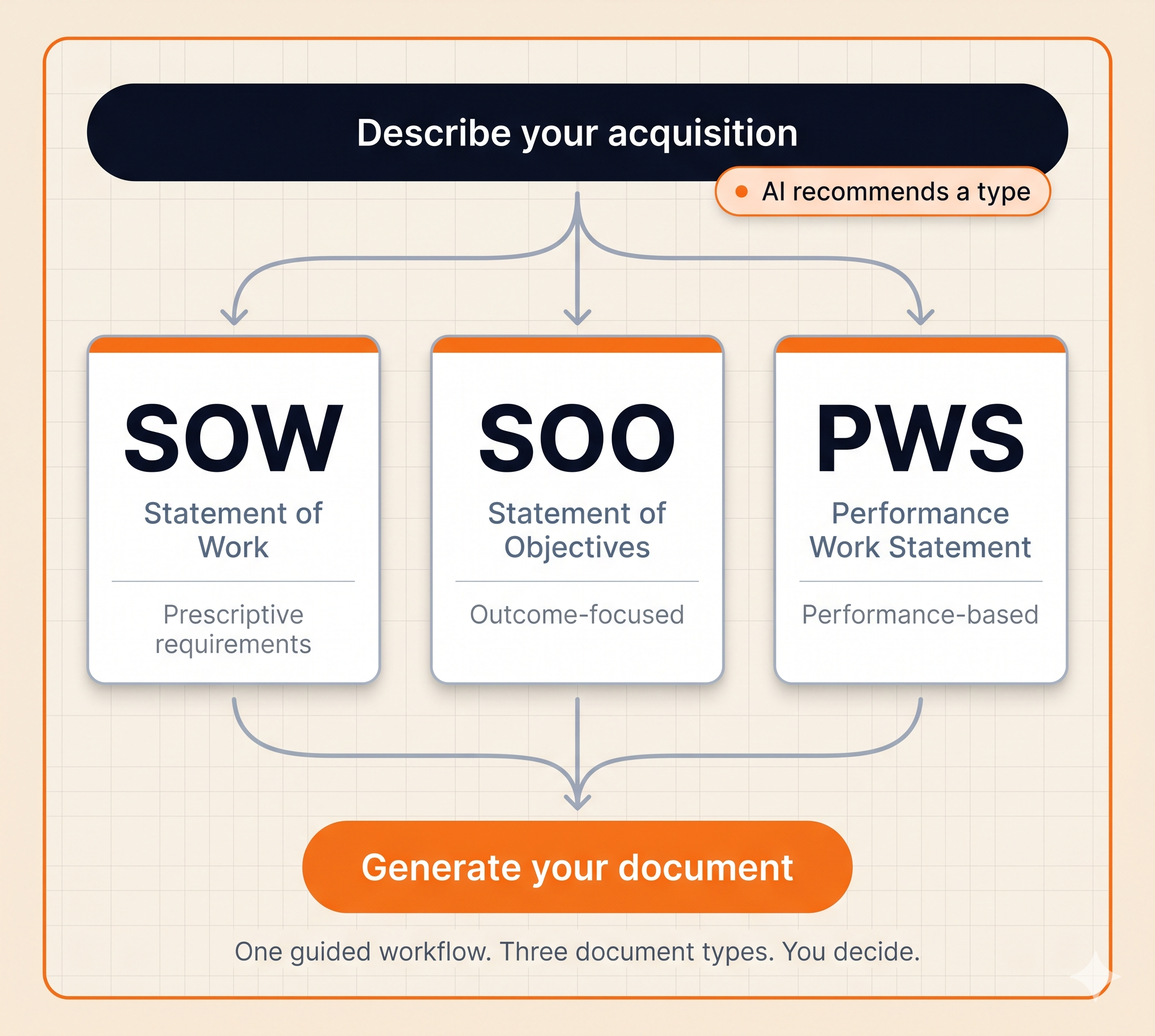
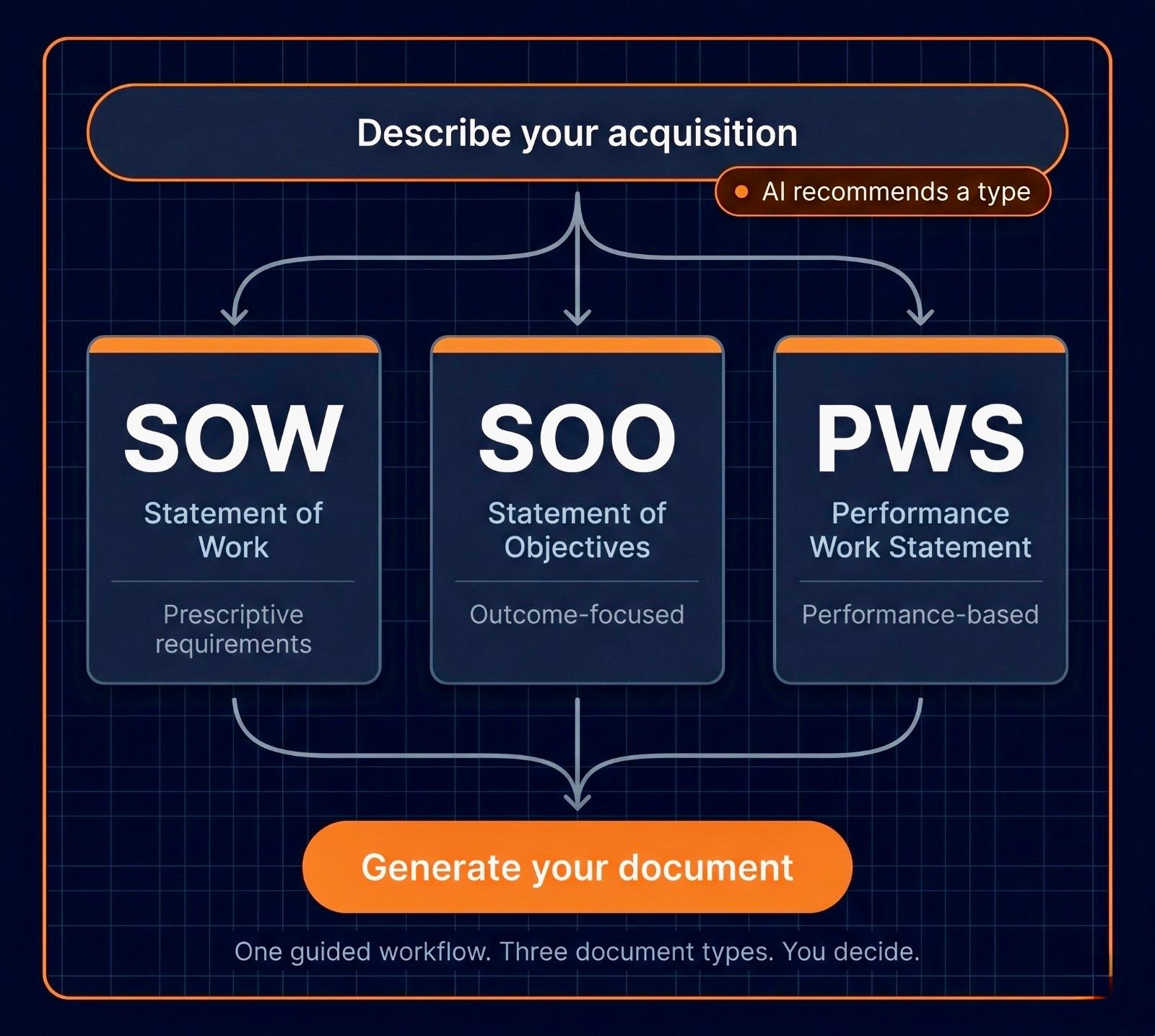
Every project in SOWrite starts with a single decision: SOW, SOO, or PWS. If you already know what you need, you select it and move on. If you're not sure, simply describe what you need to accomplish and SOWrite recommends a document type with a short explanation of why it fits. You can accept or override. The choice is yours, the rationale is captured in the audit trail.
Capture initial requirements
Requirements owners enter what they know through structured input forms or upload existing documents. SOWrite accepts PDF, DOCX, and XLSX files, extracts the requirements language, and brings everything into a single working record tied to a specific RFP.
AI-assisted clarification
The platform analyzes what has been captured, identifies gaps and ambiguities specific to the document type you selected, and generates clarification questions in the voice of an experienced acquisition specialist. The user answers one question at a time. Answers feed back into the requirements record. Every question, answer, and refinement is captured in the audit log.
Generate your document
Once requirements are complete, SOWrite generates your SOW, SOO, or PWS using a federal-format template tuned to the document type. The document is reviewable in preview, editable before final export, and downloadable as DOCX or PDF. SOW versions are tracked over time so you can compare drafts or roll back changes.
Federal-grade by design, not by retrofit.
SOWrite was built for federal use from the first line of code by a team dedicated to serving federal agencies. That shows up in the security model, the data handling, and the compliance posture.
Sensitive data stays protected
All content uploaded into SOWrite is treated as Controlled Unclassified Information by default. Files live in encrypted private storage and are accessed only through signed URLs. Before any requirement excerpt reaches the AI service, it passes through extraction and redaction layers designed to strip PII and other sensitive content. Full unredacted files are never sent to the model.
Identity-aware access control
Access is mediated by an identity-aware proxy with zero-trust controls. Every request is authenticated before it reaches the application. Role-based access control governs what each user can do: viewers can read documents, requirement managers can capture requirements and run QA sessions, and admins manage users and configuration.
Comprehensive audit logging
Every state change in SOWrite generates an append-only audit log entry. Action, actor, timestamp, and the affected record are all captured. Logs export to government-standard SIEM platforms, and audit data can be retained on write-once storage with retention lock for tamper resistance.
Aligned with federal compliance frameworks
SOWrite is designed to support FISMA Moderate and aligns with the NIST Cybersecurity Framework. The architecture is compatible with FedRAMP Moderate baseline controls when deployed in a customer's authorized cloud environment.
Built for the people who write the requirements and the people who shepherd them into RFPs.
Requirements owners and program managers
The people who know what the agency needs but spend more time than they should translating that knowledge into acquisition-ready language. SOWrite gives them a structured starting point, asks the right follow-up questions, and produces a document they can hand to acquisition with confidence.
Contracting officers and acquisition specialists
The people responsible for turning requirements into a defensible, executable RFP package. SOWrite reduces the back-and-forth, surfaces gaps before they become amendments, and produces a SOW with a complete audit trail ready for the contract file.
Acquisition leadership and policy
The people accountable for cycle time, quality, and consistency across an acquisition portfolio. SOWrite gives them a tool that standardizes how requirements are captured, how completeness is verified, and how SOW documents are produced across the workforce.
SOWrite and Scorify are designed to work together.
A federal acquisition has two halves. SOWrite lives in the first, helping your team write the RFP. Scorify lives in the second, helping your team evaluate the proposals that come back. Used together, they create a closed loop where the structure that goes out the door is the same structure that comes back in.
Common questions about SOWrite.
Where does the data we put into SOWrite go?
Does SOWrite replace our acquisition workforce?
What document formats does SOWrite generate?
What file types can we upload as input?
Can SOWrite be deployed on contract vehicles we already use?
How does SOWrite handle audit and compliance requirements?
Clear, complete acquisition documents. In a fraction of the time.
The best way to understand what SOWrite can do is to see it work on your own requirements. We offer scoped pilot engagements that put SOWrite in front of your acquisition workforce on a representative requirements package, with full audit logging from day one and clear success criteria up front. From a blank page to a finished document, faster than your team thought possible.